Manage a contact
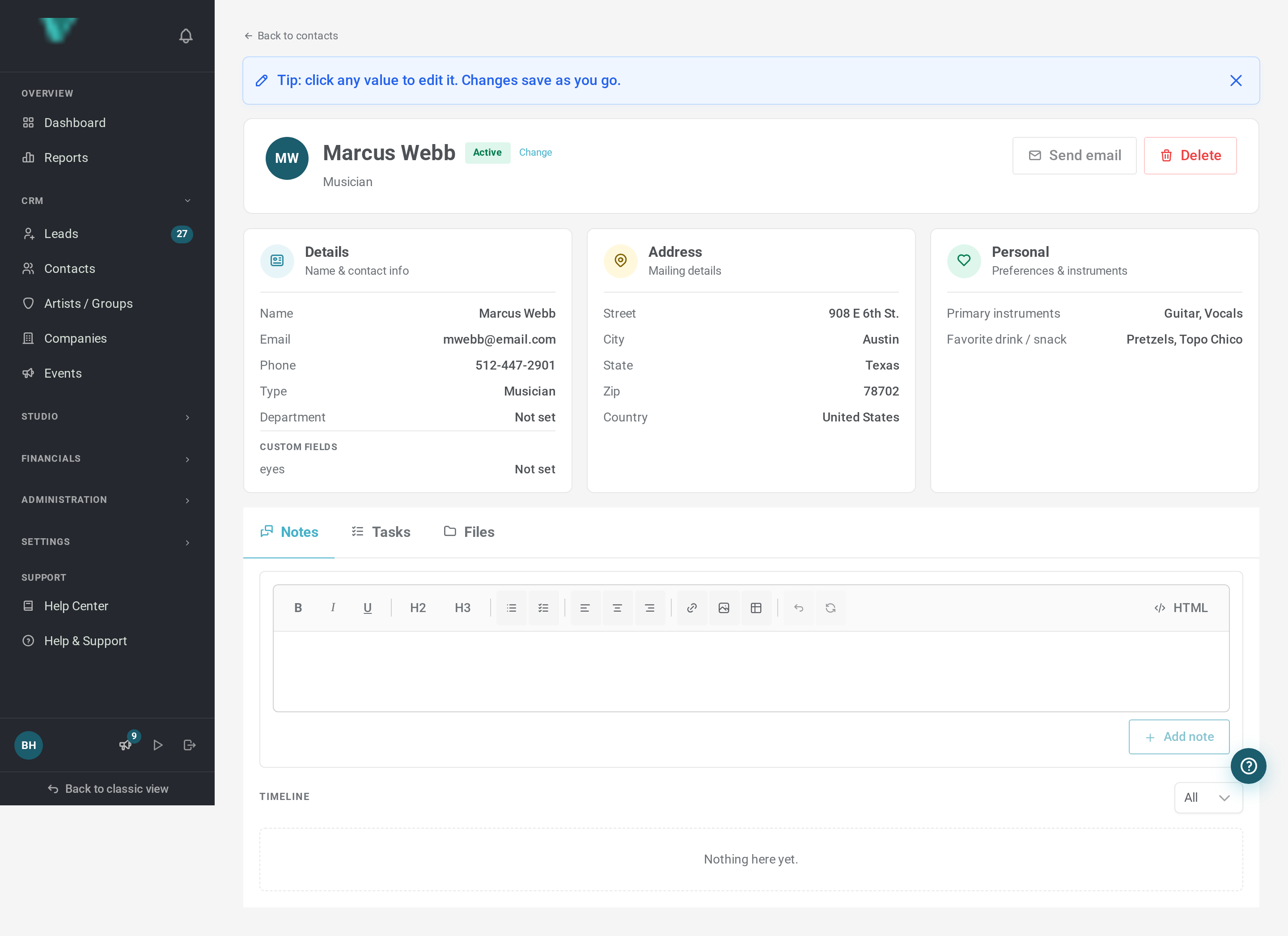
Select a contact from the list to open its detail page. This page is a workspace for everything about that person, and you edit most of it in place.
The header
The top of the page shows the contact's name, their Active or Inactive status, their type, and their company. Use Change next to the status to switch between Active and Inactive. Send email opens a message to the contact, and Delete removes the record.
Edit fields in place
The details are grouped into three cards: Details (name, email, phone, type, department), Address, and Personal (primary instruments, favorite drink or snack). Select any value to edit it right there. Press Enter to save your change or Escape to cancel. There is no separate edit mode to enter or leave.
If the contact is linked to any projects, those appear on the page as links you can follow.
Notes
The Notes tab keeps a running record of conversations and details about the contact. Every note is saved permanently and stamped with the name of the user who wrote it and the date and time. If you have several users, everyone sees the notes recorded by the whole team.
Tasks
The Tasks tab is a checklist tied to this contact. New tasks default to being associated with the contact, and you can set a reminder with a date and time so Sonido notifies you when it is due.
Files
The Files tab holds documents you upload against the contact.
Delete a contact
Select Delete in the header to remove the record. You confirm the deletion first. This cannot be undone, so be sure before you continue.